搜索到
88
篇与
的结果
-
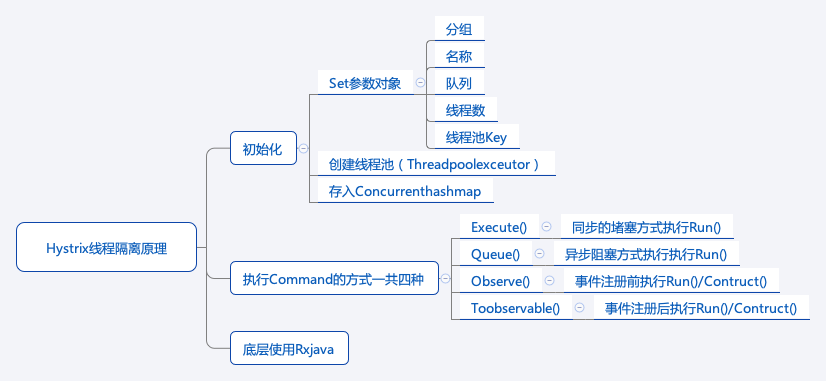
 聊聊Hystrix 聊聊Hystrix 一、引言 在分布式系统中,服务之间的调用错综复杂,一个服务的故障可能会引发连锁反应,导致整个系统的雪崩效应。Hystrix作为一款强大的容错库,通过一系列机制保障系统的稳定性和可用性。本文将深入探讨Hystrix的核心原理。 二、Hystrix线程隔离原理 (一)初始化 Set参数对象:Hystrix在初始化时,需要设置一系列参数对象,包括分组(用于将相关的命令归为一组,方便资源管理和统计)、名称(标识具体的命令)、队列(用于存放待执行的任务) 、线程数(指定线程池中的线程数量,决定了能同时处理的请求量)以及线程池Key(用于唯一标识线程池)。 创建线程池(Threadpoolexcutor):根据设置的参数创建线程池,线程池是Hystrix实现线程隔离的关键组件。通过线程池,不同的服务调用可以在各自独立的线程中执行,避免了一个服务调用的阻塞影响其他调用。 存入Concurrenthashmap:将创建好的线程池存入Concurrenthashmap中,便于后续快速获取和管理。 (二)执行Command的方式 Execute():以同步的堵塞方式执行Run() 方法。这意味着调用线程会一直等待命令执行完成并返回结果,如果命令执行时间较长,调用线程会被阻塞,适用于需要立即获取结果且对响应时间要求不特别高的场景。 Queue():采用异步阻塞方式执行Run() 。它会立即返回一个Future对象,调用线程可以通过这个Future对象在后续合适的时机获取执行结果,在获取结果之前,调用线程不会被一直阻塞,适用于一些后台任务处理场景。 Observe():在事件注册前执行Run()/Construct() 。它返回一个Observable对象,通过订阅这个对象可以获取命令执行结果,并且可以在命令执行前进行一些事件注册和预处理操作。 Toobservable():在事件注册后执行Run()/Construct() 。同样返回Observable对象,不过是在事件注册之后才开始执行命令逻辑,提供了更灵活的事件处理和结果订阅机制。 (三)底层使用Rxjava Hystrix的底层实现依赖于Rxjava,Rxjava是一个基于事件流、实现异步操作的库。它提供了丰富的操作符来处理异步任务、事件流的组合和转换等。在Hystrix中,利用Rxjava的特性可以更方便地实现异步执行、事件监听以及对命令执行结果的处理等功能,使得Hystrix的异步操作更加简洁和高效。 三、Hystrix的其他关键机制 (一)熔断器(Circuit Breaker) 熔断器就像一个开关,当服务调用的失败率达到一定阈值(比如在一定时间内失败率超过50% ),熔断器会被打开,后续对该服务的调用将不再实际执行,而是直接返回一个预设的 fallback 结果(比如默认值或者缓存数据)。这样可以快速失败,避免大量无效的调用,防止故障扩散。当熔断器打开一段时间后(称为休眠窗口),会尝试半开状态,允许少量请求通过,来检测服务是否已经恢复正常,如果恢复则关闭熔断器,否则继续保持打开状态。 (二)降级(Fallback) 降级是Hystrix的重要保护机制。当服务调用失败(如超时、异常等情况)或者熔断器打开时,会触发降级逻辑。开发人员可以自定义fallback方法,返回默认值、缓存数据或者一些简单的错误提示信息等,从而保证即使在服务不可用的情况下,系统仍能给用户提供一定的响应,而不是直接报错,提升了用户体验和系统的稳定性。 (三)请求缓存(Request Caching) Hystrix支持请求缓存功能,在一次请求过程中,如果相同的命令被多次调用,Hystrix可以从缓存中直接获取结果,而不需要重新执行命令。这在一些频繁调用相同服务且结果相对稳定的场景下,可以大大减少不必要的服务调用,提高系统的响应速度和性能。 四、总结 Hystrix通过线程隔离、熔断器、降级、请求缓存等一系列精心设计的原理和机制,为分布式系统构建了强大的容错体系。理解这些原理,有助于我们在实际开发中合理配置和使用Hystrix,提升系统的健壮性和可靠性,更好地应对复杂多变的分布式环境中的各种故障和挑战。 五 实操 1. 引入依赖 在pom.xml文件中添加相关依赖: <dependency> <groupId>org.springframework.cloud</groupId> <artifactId>spring - cloud - starter - hystrix</artifactId> </dependency> <dependency> <groupId>org.springframework.boot</groupId> <artifactId>spring - boot - starter - web</artifactId> </dependency> 2. 启用Hystrix 在Spring Boot应用的主类上添加@EnableHystrix注解来启用Hystrix: import org.springframework.boot.SpringApplication; import org.springframework.boot.autoconfigure.SpringBootApplication; import org.springframework.cloud.netflix.hystrix.EnableHystrix; @SpringBootApplication @EnableHystrix public class HystrixApplication { public static void main(String[] args) { SpringApplication.run(HystrixApplication.class, args); } } 3. 线程隔离与命令执行示例 创建一个服务类,定义一个使用HystrixCommand的方法: import com.netflix.hystrix.HystrixCommand; import com.netflix.hystrix.HystrixCommandGroupKey; import com.netflix.hystrix.HystrixCommandProperties; public class HelloWorldHystrixCommand extends HystrixCommand<String> { private final String name; public HelloWorldHystrixCommand(String name) { super(Setter.withGroupKey(HystrixCommandGroupKey.Factory.asKey("ExampleGroup")) .andCommandPropertiesDefaults( HystrixCommandProperties.Setter() .withExecutionTimeoutInMilliseconds(5000) // 设置执行超时时间 )); this.name = name; } @Override protected String run() { // 模拟实际的服务调用,这里简单返回问候语 return "Hello, " + name + "!"; } @Override protected String getFallback() { // 降级逻辑,当run方法执行失败时调用 return "Sorry, something went wrong while greeting you, " + name + "!"; } } 使用这个命令类: public class Main { public static void main(String[] args) { HelloWorldHystrixCommand command = new HelloWorldHystrixCommand("John"); // 同步执行方式 String result = command.execute(); System.out.println(result); // 异步执行方式 command.queue(); } } 4. 基于Spring Boot和注解的Hystrix使用 创建一个服务接口和实现类: import org.springframework.stereotype.Service; @Service public class HelloService { @com.netflix.hystrix.contrib.javanica.annotation.HystrixCommand(fallbackMethod = "fallbackHello") public String sayHello(String name) { // 模拟可能失败的服务调用,比如网络延迟或异常 if (Math.random() < 0.2) { // 20%的概率模拟失败 throw new RuntimeException("Service error"); } return "Hello, " + name + "!"; } public String fallbackHello(String name) { return "Sorry, can't say hello right now, " + name + "!"; } } 创建一个控制器类来调用服务: import org.springframework.beans.factory.annotation.Autowired; import org.springframework.web.bind.annotation.GetMapping; import org.springframework.web.bind.annotation.RequestParam; import org.springframework.web.bind.annotation.RestController; @RestController public class HelloController { @Autowired private HelloService helloService; @GetMapping("/hello") public String hello(@RequestParam String name) { return helloService.sayHello(name); } } 以上代码分别展示了Hystrix基本命令的使用方式,包括线程隔离下的命令执行以及基于Spring Boot和注解的服务熔断降级功能。实际应用中,可根据业务需求进一步调整配置和逻辑 。
 -
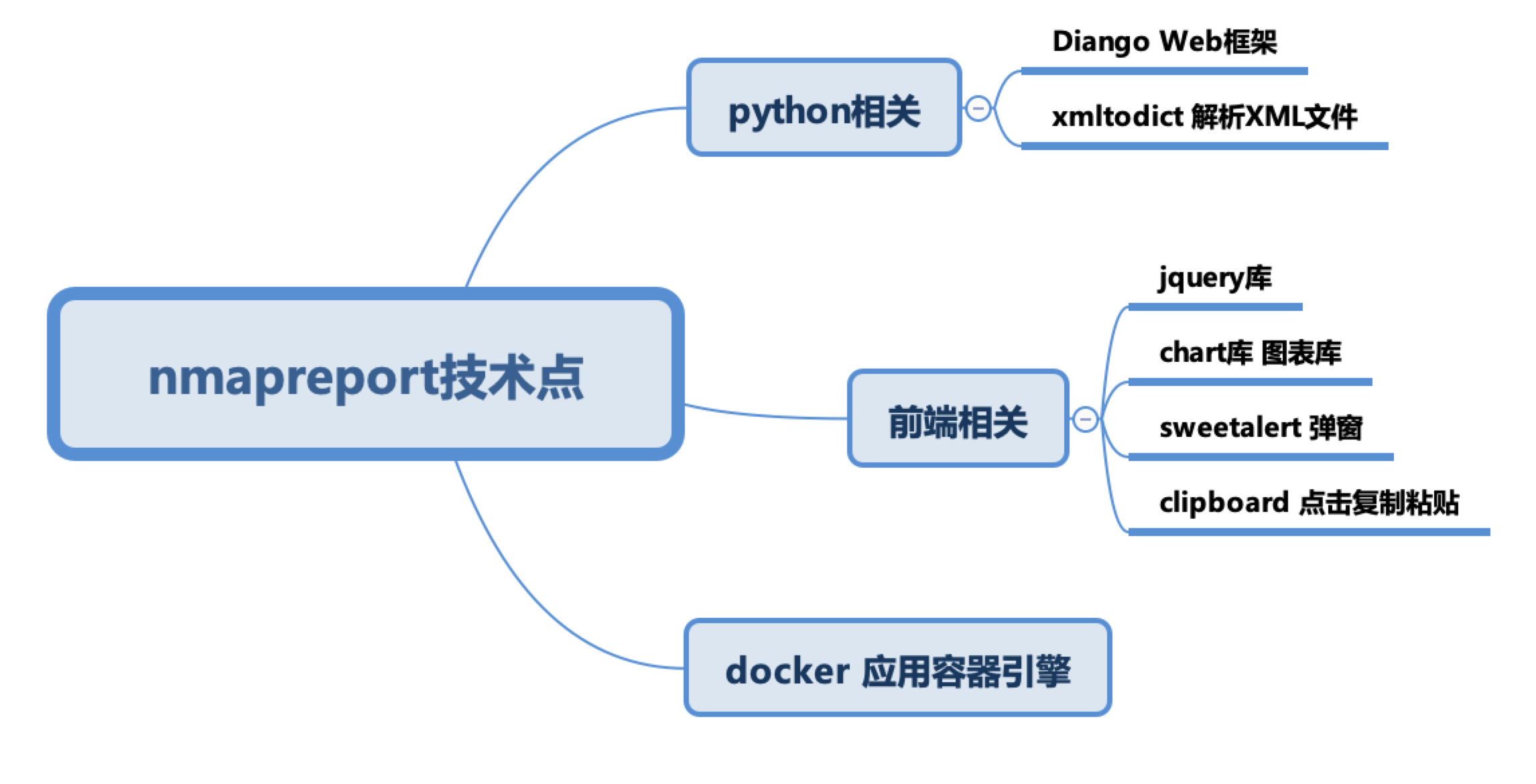
帮朋友撸的一个居于nmap和cve扫描服务漏洞的程序 帮朋友撸的一个居于nmap和cve扫描服务漏洞的程序 现在开源 源码地址:https://github.com/javajeans/nmapreport A Web Dashbord for Nmap And Cve XML Report 使用说明 目录结构 |——————docker docker配置相关 | |———settings.py diango、python的基础系统环境配置 | |———urls.py URL分发器(路由配置文件) |——————nmap | |———nse 暂时不需要 | |———cron.py 任务调度规则 |——————static 本地文件,其中包括css文件夹存放css文件 | |———async.js js脚本 |——————templates html模板文件 |——————nmapreport | |———main.html 页面主体 | |———nmap_auth.html 授权模板(暂时不用) | |———nmap_hostdetails.html network模板 | |———nmap_ndiff.html nmap cve比对(是否重新扫描) | |———nmap_network.html 网络视图模块 | |———nmap_portdetails.html 报告详情 | |———nmap_xmlfiles.html 主页显示内容 | |———report.html 报告 |——————api.py #请求接口方法实现 |——————apps.py 启动入口 |——————functions.py 常规函数 |——————functions_nmap.py nmap相关函数 |——————ndiff.py nmap,cve比对 |——————network.py 网络视图相关逻辑 |——————pdf.py pdf生成逻辑 |——————token.py token生成逻辑 |——————urls.py 路由 |——————views.py 视图跳转逻辑 需要的环境 docker(https://docs.docker.com/) Virtualbox[https://www.virtualbox.org/wiki/Downloads] (演示使用) 技术说明 演示环境说明 如何本地搭建环境测试 搭建两台虚拟机 一台作为扫描、一台被扫描(或者多台,可安装windows、mac等)建议使用virtualbox 系统使用 1.点击"进入系统" 2.创建Nmap扫描 3.扫码列表 4.扫码详情 5.cve检查漏洞 如何使用 docker run -d -v /opt/nmapreport/docker/xml:/opt/xml -p 8081:8000 1249913118/nmapreport 代码位置:/opt/nmapdashboard/nmapreport,可以将此文件映射出来,直接修改 注意:代码修改可执行docker build -t nmapreport:latest .如果不想使用docker可以直接部署在linux环境内(mac、centos、ubuntu) 部署可参考docker的dockerfile文件步骤
-
Spring Security OAuth2在微前端架构下实现统一退出 Spring Security OAuth2在微前端架构下实现统一退出 在微前端架构中,当一个应用退出登录时,实现所有应用同步退出的功能是一个常见需求。这个问题主要源于微前端架构下各个子应用之间的分离特性,导致一个应用注销后,其他应用仍保持登录状态。下面我将详细介绍如何解决这个问题。 问题分析 微前端架构下,登出问题主要有以下几个原因: 各子应用可能使用独立的会话管理 OAuth2 token可能在各应用中独立存储 缺乏统一的退出机制来协调各个子应用 解决方案 1. 实现单点登出(Single Sign-Out) @RestController public class LogoutController { private final TokenStore tokenStore; private final ClientRegistrationRepository clientRegistrationRepository; public LogoutController(TokenStore tokenStore, ClientRegistrationRepository clientRegistrationRepository) { this.tokenStore = tokenStore; this.clientRegistrationRepository = clientRegistrationRepository; } @PostMapping("/api/logout") public ResponseEntity<Map<String, String>> logout( @RequestParam(value = "token", required = false) String token, HttpServletRequest request, HttpServletResponse response, @AuthenticationPrincipal OAuth2User principal) { // 获取当前认证信息 Authentication auth = SecurityContextHolder.getContext().getAuthentication(); // 如果存在认证信息,则进行处理 if (auth != null) { // 撤销token if (auth instanceof OAuth2AuthenticationToken) { OAuth2AuthenticationToken oauthToken = (OAuth2AuthenticationToken) auth; String clientRegistrationId = oauthToken.getAuthorizedClientRegistrationId(); // 根据需要调用OAuth2服务器的撤销接口 revokeToken(clientRegistrationId, token); } // 清除安全上下文 SecurityContextHolder.clearContext(); // 使session失效 HttpSession session = request.getSession(false); if (session != null) { session.invalidate(); } // 清除相关cookie deleteCookies(request, response); } Map<String, String> result = new HashMap<>(); result.put("message", "成功退出登录"); return ResponseEntity.ok(result); } private void revokeToken(String clientRegistrationId, String token) { try { ClientRegistration clientRegistration = clientRegistrationRepository.findByRegistrationId(clientRegistrationId); if (clientRegistration != null && token != null) { // 根据OAuth2服务器提供的撤销端点进行token撤销 String revokeEndpoint = clientRegistration.getProviderDetails().getConfigurationMetadata().get("revocation_endpoint").toString(); RestTemplate restTemplate = new RestTemplate(); HttpHeaders headers = new HttpHeaders(); headers.setContentType(MediaType.APPLICATION_FORM_URLENCODED); MultiValueMap<String, String> map = new LinkedMultiValueMap<>(); map.add("token", token); map.add("client_id", clientRegistration.getClientId()); map.add("client_secret", clientRegistration.getClientSecret()); HttpEntity<MultiValueMap<String, String>> request = new HttpEntity<>(map, headers); restTemplate.postForEntity(revokeEndpoint, request, String.class); } } catch (Exception e) { // 处理可能的异常 logger.error("撤销token失败", e); } } private void deleteCookies(HttpServletRequest request, HttpServletResponse response) { Cookie[] cookies = request.getCookies(); if (cookies != null) { for (Cookie cookie : cookies) { // 删除认证相关的cookie if (cookie.getName().startsWith("OAUTH2_") || cookie.getName().equals("JSESSIONID") || cookie.getName().equals("SESSION")) { Cookie newCookie = new Cookie(cookie.getName(), null); newCookie.setPath("/"); newCookie.setMaxAge(0); newCookie.setHttpOnly(true); response.addCookie(newCookie); } } } } } 2. 创建统一的登出前端服务 // auth-service.js export class AuthService { constructor() { this.logoutListeners = []; this.setupLogoutListener(); } // 添加登出监听器 addLogoutListener(callback) { this.logoutListeners.push(callback); return () => { this.logoutListeners = this.logoutListeners.filter(cb => cb !== callback); }; } // 发送登出事件到所有注册的应用 notifyLogout() { // 通过BroadcastChannel发送消息 const bc = new BroadcastChannel('auth-logout-channel'); bc.postMessage({ type: 'LOGOUT' }); bc.close(); // 同时触发监听器 this.logoutListeners.forEach(callback => callback()); } // 监听其他应用的登出事件 setupLogoutListener() { const bc = new BroadcastChannel('auth-logout-channel'); bc.onmessage = (event) => { if (event.data.type === 'LOGOUT') { // 执行本地登出操作 this.logout(false); // 不广播,避免循环 } }; } // 登出方法 async logout(broadcast = true) { try { // 调用后端登出API const response = await fetch('/api/logout', { method: 'POST', credentials: 'include', headers: { 'Content-Type': 'application/json' } }); if (response.ok) { // 清除本地存储 localStorage.removeItem('oauth2_token'); sessionStorage.removeItem('oauth2_token'); // 清除相关cookie this.clearAuthCookies(); // 通知其他应用 if (broadcast) { this.notifyLogout(); } return true; } else { console.error('登出失败:', await response.text()); return false; } } catch (error) { console.error('登出过程中发生错误:', error); return false; } } // 清除认证相关cookie clearAuthCookies() { const cookies = document.cookie.split(';'); for (let i = 0; i < cookies.length; i++) { const cookie = cookies[i]; const eqPos = cookie.indexOf('='); const name = eqPos > -1 ? cookie.substring(0, eqPos).trim() : cookie.trim(); if (name.startsWith('OAUTH2_') || name === 'JSESSIONID' || name === 'SESSION') { document.cookie = `${name}=;path=/;expires=Thu, 01 Jan 1970 00:00:00 GMT`; } } } // 检查是否已登录 isAuthenticated() { // 根据实际存储方式检查认证状态 return localStorage.getItem('oauth2_token') !== null || sessionStorage.getItem('oauth2_token') !== null; } } // 导出单例 export const authService = new AuthService(); 3. 创建主应用的登出组件 // LogoutButton.jsx (React组件示例) import React from 'react'; import { authService } from './auth-service'; const LogoutButton = () => { const handleLogout = async () => { const success = await authService.logout(); if (success) { // 重定向到登录页或首页 window.location.href = '/login'; } else { alert('登出失败,请重试'); } }; return ( <button className="logout-button" onClick={handleLogout} > 退出登录 </button> ); }; export default LogoutButton; 4. 为各个微前端应用添加登出监听 // 在每个子应用的入口文件中添加 import { authService } from 'shared-lib/auth-service'; class MicroApp { constructor() { this.init(); } init() { // 注册登出监听器 this.unsubscribeLogout = authService.addLogoutListener(() => { // 当收到登出事件时,清理本地状态 this.handleLogout(); }); // 监听卸载事件,移除监听器 window.addEventListener('unload', () => { if (this.unsubscribeLogout) { this.unsubscribeLogout(); } }); // 设置全局登出处理方法 window.microAppLogout = () => { authService.logout(); }; } handleLogout() { // 清理本地存储 localStorage.removeItem('app_state'); sessionStorage.removeItem('app_state'); // 重置应用状态 this.resetAppState(); // 可选:重定向到登录页 window.location.href = '/login'; } resetAppState() { // 重置应用状态逻辑 // ... } } // 初始化应用 const app = new MicroApp(); 5. 使用Redis实现会话共享 为了确保后端会话的统一管理,应使用Redis存储会话: @Configuration @EnableRedisHttpSession public class RedisSessionConfig { @Bean public RedisTemplate<String, Object> redisTemplate(RedisConnectionFactory connectionFactory) { RedisTemplate<String, Object> template = new RedisTemplate<>(); template.setConnectionFactory(connectionFactory); // 使用Jackson2为序列化和反序列化 Jackson2JsonRedisSerializer<Object> serializer = new Jackson2JsonRedisSerializer<>(Object.class); ObjectMapper mapper = new ObjectMapper(); mapper.setVisibility(PropertyAccessor.ALL, JsonAutoDetect.Visibility.ANY); mapper.activateDefaultTyping( LaissezFaireSubTypeValidator.instance, ObjectMapper.DefaultTyping.NON_FINAL, JsonTypeInfo.As.PROPERTY ); serializer.setObjectMapper(mapper); template.setKeySerializer(new StringRedisSerializer()); template.setValueSerializer(serializer); template.setHashKeySerializer(new StringRedisSerializer()); template.setHashValueSerializer(serializer); template.afterPropertiesSet(); return template; } @Bean public HttpSessionIdResolver httpSessionIdResolver() { // 使用Cookie和Header双重策略,提高灵活性 return new CookieAndHeaderHttpSessionIdResolver(); } } // 自定义会话ID解析器,支持Cookie和Header class CookieAndHeaderHttpSessionIdResolver implements HttpSessionIdResolver { private static final String HEADER_NAME = "X-Auth-Token"; private final CookieHttpSessionIdResolver cookieResolver = new CookieHttpSessionIdResolver(); private final HeaderHttpSessionIdResolver headerResolver = HeaderHttpSessionIdResolver.xAuthToken(); @Override public List<String> resolveSessionIds(HttpServletRequest request) { List<String> sessionIds = cookieResolver.resolveSessionIds(request); if (sessionIds.isEmpty()) { sessionIds = headerResolver.resolveSessionIds(request); } return sessionIds; } @Override public void setSessionId(HttpServletRequest request, HttpServletResponse response, String sessionId) { cookieResolver.setSessionId(request, response, sessionId); headerResolver.setSessionId(request, response, sessionId); } @Override public void expireSession(HttpServletRequest request, HttpServletResponse response) { cookieResolver.expireSession(request, response); headerResolver.expireSession(request, response); } } 6. 实现OAuth2统一退出端点 为了完全支持OAuth2退出,还需要实现一个注销端点连接到OAuth2服务器: @Configuration public class OAuth2LogoutConfig { private final ClientRegistrationRepository clientRegistrationRepository; public OAuth2LogoutConfig(ClientRegistrationRepository clientRegistrationRepository) { this.clientRegistrationRepository = clientRegistrationRepository; } @Bean public SecurityFilterChain securityFilterChain(HttpSecurity http) throws Exception { http .authorizeHttpRequests(authorize -> authorize .requestMatchers("/api/public/**", "/login", "/oauth2/authorization/**").permitAll() .anyRequest().authenticated() ) .oauth2Login(oauth2 -> oauth2 .loginPage("/login") .defaultSuccessUrl("/dashboard") ) .logout(logout -> logout .logoutUrl("/api/logout") .logoutSuccessHandler(this.oidcLogoutSuccessHandler()) .invalidateHttpSession(true) .clearAuthentication(true) .deleteCookies("JSESSIONID", "SESSION") ); return http.build(); } private LogoutSuccessHandler oidcLogoutSuccessHandler() { OidcClientInitiatedLogoutSuccessHandler oidcLogoutSuccessHandler = new OidcClientInitiatedLogoutSuccessHandler(this.clientRegistrationRepository); // 设置退出后的重定向URL oidcLogoutSuccessHandler.setPostLogoutRedirectUri("{baseUrl}/login?logout=success"); return (request, response, authentication) -> { // 获取会话中的信息用于撤销token等操作 HttpSession session = request.getSession(false); if (session != null) { String idToken = (String) session.getAttribute("id_token"); if (idToken != null && authentication instanceof OAuth2AuthenticationToken) { OAuth2AuthenticationToken oauthToken = (OAuth2AuthenticationToken) authentication; ClientRegistration clientRegistration = this.clientRegistrationRepository .findByRegistrationId(oauthToken.getAuthorizedClientRegistrationId()); // 尝试撤销令牌 try { revokeTokens(clientRegistration, request); } catch (Exception e) { // 记录错误但继续退出流程 e.printStackTrace(); } } } // 调用OIDC退出处理器 oidcLogoutSuccessHandler.onLogoutSuccess(request, response, authentication); }; } private void revokeTokens(ClientRegistration clientRegistration, HttpServletRequest request) { // 实现令牌撤销逻辑 HttpSession session = request.getSession(false); if (session != null && clientRegistration != null) { String accessToken = (String) session.getAttribute("access_token"); String refreshToken = (String) session.getAttribute("refresh_token"); if (accessToken != null || refreshToken != null) { // 检查是否有撤销端点配置 Object revocationUri = clientRegistration.getProviderDetails() .getConfigurationMetadata().get("revocation_endpoint"); if (revocationUri != null) { RestTemplate restTemplate = new RestTemplate(); HttpHeaders headers = new HttpHeaders(); headers.setContentType(MediaType.APPLICATION_FORM_URLENCODED); headers.setBasicAuth(clientRegistration.getClientId(), clientRegistration.getClientSecret()); // 撤销访问令牌 if (accessToken != null) { MultiValueMap<String, String> body = new LinkedMultiValueMap<>(); body.add("token", accessToken); body.add("token_type_hint", "access_token"); HttpEntity<MultiValueMap<String, String>> entity = new HttpEntity<>(body, headers); restTemplate.postForEntity(revocationUri.toString(), entity, String.class); } // 撤销刷新令牌 if (refreshToken != null) { MultiValueMap<String, String> body = new LinkedMultiValueMap<>(); body.add("token", refreshToken); body.add("token_type_hint", "refresh_token"); HttpEntity<MultiValueMap<String, String>> entity = new HttpEntity<>(body, headers); restTemplate.postForEntity(revocationUri.toString(), entity, String.class); } } } } } } 实现要点解析 统一后端登出端点 清除服务器端会话 撤销OAuth2令牌 删除相关Cookie 通知OAuth2授权服务器 前端统一登出机制 使用BroadcastChannel进行跨应用通信 共享认证服务实现登出状态同步 提供全局登出方法 使用Redis共享会话 确保所有后端服务访问相同的会话存储 支持会话的快速失效 前端存储清理 清除localStorage和sessionStorage中的认证信息 删除认证相关Cookie 最佳实践 使用OpenID Connect(OIDC)标准 利用OIDC的标准登出流程 实现前后端退出的协调 使用统一的会话ID 为所有微前端应用使用相同的会话标识 避免使用多种会话管理方式 实现健壮的错误处理 当部分退出流程失败时仍能完成整体退出 提供清晰的用户反馈 安全考虑 确保退出端点的安全访问 防止CSRF攻击 结论 通过上述方案的实现,可以确保微前端架构下的统一退出机制,使得用户在任一子应用退出后,所有应用都同步退出登录状态。这种方案既保证了用户体验的一致性,也提高了系统的安全性,避免了部分应用仍保持登录状态可能带来的安全风险。 刚好再学react,就用react写前端了
-
MySQL与PostgreSQL的区别与简单对比 MySQL与PostgreSQL的区别与对比 MySQL和PostgreSQL都是极其流行的关系型数据库管理系统,但它们在设计理念、功能特性和使用场景上存在显著差异。以下是它们之间的主要区别与对比: 基本概述 MySQL: 起源于1995年,现由Oracle公司拥有 以速度和简单性为设计重点 广泛应用于Web应用程序,特别是LAMP架构(Linux, Apache, MySQL, PHP) PostgreSQL: 始于1986年的Berkeley Postgres项目 强调标准合规性和扩展性 被称为"最先进的开源数据库" 主要差异对比 1. 架构与设计理念 MySQL: 多存储引擎架构(InnoDB, MyISAM等) 注重简单性和性能 适合读密集型应用 PostgreSQL: 单一存储引擎 注重数据完整性和功能丰富性 适合复杂查询和大型数据库 2. 事务和ACID支持 MySQL: 在InnoDB引擎中完全支持ACID 其他引擎如MyISAM不完全支持事务 PostgreSQL: 完全支持ACID 提供更强的事务隔离默认级别 3. SQL标准合规性 MySQL: 实现了SQL标准的子集 有一些自定义的SQL扩展 PostgreSQL: 高度遵循SQL标准 支持更多SQL高级特性 4. 数据类型支持 MySQL: 基本数据类型支持良好 对JSON支持较晚引入 PostgreSQL: 丰富的数据类型(如数组、hstore、地理信息类型等) 早期就支持JSON/JSONB,并提供丰富操作函数 支持自定义数据类型 5. 并发控制 MySQL: 主要使用行级锁(InnoDB) 对高并发读取优化较好 PostgreSQL: 使用多版本并发控制(MVCC) 读不阻塞写,写不阻塞读 6. 性能表现 MySQL: 简单查询性能通常更好 读操作性能优秀 PostgreSQL: 复杂查询性能更优 写密集型应用表现优异 大数据量处理能力强 7. 复制与高可用 MySQL: 支持主从复制、组复制 有多种高可用解决方案(MySQL Cluster等) PostgreSQL: 支持流复制、逻辑复制 提供强大的故障转移和高可用功能(如Patroni) 8. 扩展性 MySQL: 插件系统有限 存储过程功能较基础 PostgreSQL: 强大的扩展系统 支持多种编程语言创建存储过程(PL/pgSQL, PL/Python等) 支持自定义运算符和索引类型 适用场景 MySQL更适合: 读密集型网站和应用 需要简单配置和管理的项目 OLTP(联机事务处理)工作负载 对成本敏感的项目 PostgreSQL更适合: 需要复杂查询的数据密集型应用 需要严格数据完整性的场景 地理信息系统(GIS)应用 数据仓库和分析应用 需要自定义数据类型和函数的场景 MySQL与PostgreSQL的SQL编写细节差异与案例 在MySQL和PostgreSQL之间,SQL语法和编写方式存在一些显著差异。以下是一些主要区别和具体案例: 标识符引用方式 MySQL:使用反引号`引用表名和列名 SELECT `user_id`, `username` FROM `users` WHERE `status` = 'active'; PostgreSQL:使用双引号"引用表名和列名 SELECT "user_id", "username" FROM "users" WHERE "status" = 'active'; 自增列定义 MySQL: CREATE TABLE users ( id INT AUTO_INCREMENT PRIMARY KEY, name VARCHAR(100) ); PostgreSQL: CREATE TABLE users ( id SERIAL PRIMARY KEY, name VARCHAR(100) ); 字符串连接 MySQL:使用CONCAT函数 SELECT CONCAT(first_name, ' ', last_name) AS full_name FROM employees; PostgreSQL:可以使用||运算符 SELECT first_name || ' ' || last_name AS full_name FROM employees; 限制结果集 MySQL: SELECT * FROM products ORDER BY price DESC LIMIT 10; PostgreSQL:支持LIMIT但也支持标准SQL的FETCH -- 使用LIMIT(类似MySQL) SELECT * FROM products ORDER BY price DESC LIMIT 10; -- 使用FETCH(SQL标准) SELECT * FROM products ORDER BY price DESC FETCH FIRST 10 ROWS ONLY; 日期时间处理 MySQL: -- 当前日期时间 SELECT NOW(), CURDATE(), DATE_FORMAT(created_at, '%Y-%m-%d'); -- 日期计算 SELECT DATE_ADD(order_date, INTERVAL 30 DAY) FROM orders; PostgreSQL: -- 当前日期时间 SELECT CURRENT_TIMESTAMP, CURRENT_DATE, TO_CHAR(created_at, 'YYYY-MM-DD'); -- 日期计算 SELECT order_date + INTERVAL '30 days' FROM orders; 正则表达式 MySQL: SELECT * FROM products WHERE product_name REGEXP '^Apple'; PostgreSQL: SELECT * FROM products WHERE product_name ~ '^Apple'; UPSERT操作(插入或更新) MySQL: INSERT INTO customers (id, name, email) VALUES (1, 'John Doe', 'john@example.com') ON DUPLICATE KEY UPDATE name = VALUES(name), email = VALUES(email); PostgreSQL: INSERT INTO customers (id, name, email) VALUES (1, 'John Doe', 'john@example.com') ON CONFLICT (id) DO UPDATE SET name = EXCLUDED.name, email = EXCLUDED.email; 分页查询案例 MySQL: -- 第3页,每页20条记录 SELECT * FROM products ORDER BY created_at DESC LIMIT 20 OFFSET 40; PostgreSQL: -- 同样功能,但有多种写法 SELECT * FROM products ORDER BY created_at DESC LIMIT 20 OFFSET 40; -- 或使用FETCH SELECT * FROM products ORDER BY created_at DESC OFFSET 40 ROWS FETCH NEXT 20 ROWS ONLY; 全文搜索案例 MySQL: -- 首先添加全文索引 ALTER TABLE articles ADD FULLTEXT INDEX idx_content (title, content); -- 使用全文搜索 SELECT * FROM articles WHERE MATCH(title, content) AGAINST('database performance' IN BOOLEAN MODE); PostgreSQL: -- 创建tsvector列或索引 CREATE INDEX idx_fts ON articles USING GIN (to_tsvector('english', title || ' ' || content)); -- 使用全文搜索 SELECT * FROM articles WHERE to_tsvector('english', title || ' ' || content) @@ to_tsquery('english', 'database & performance'); JSON数据处理 MySQL: -- 创建表 CREATE TABLE user_data ( id INT PRIMARY KEY, profile JSON ); -- 插入JSON数据 INSERT INTO user_data VALUES (1, '{"name": "John", "preferences": {"theme": "dark", "notifications": true}}'); -- 查询JSON数据 SELECT id, JSON_EXTRACT(profile, '$.name') AS name, JSON_EXTRACT(profile, '$.preferences.theme') AS theme FROM user_data; PostgreSQL: -- 创建表 CREATE TABLE user_data ( id INT PRIMARY KEY, profile JSONB ); -- 插入JSON数据 INSERT INTO user_data VALUES (1, '{"name": "John", "preferences": {"theme": "dark", "notifications": true}}'); -- 查询JSON数据 SELECT id, profile->>'name' AS name, profile->'preferences'->>'theme' AS theme FROM user_data; -- 使用JSONB特有的包含操作符 SELECT * FROM user_data WHERE profile @> '{"preferences": {"theme": "dark"}}'; 递归查询案例(树形结构) MySQL:使用CTE (Common Table Expressions) -- 查询组织层次结构 WITH RECURSIVE org_hierarchy AS ( -- 基本情况:顶级节点 SELECT id, name, manager_id, 1 AS level FROM employees WHERE manager_id IS NULL UNION ALL -- 递归情况:子节点 SELECT e.id, e.name, e.manager_id, oh.level + 1 FROM employees e JOIN org_hierarchy oh ON e.manager_id = oh.id ) SELECT * FROM org_hierarchy ORDER BY level, id; PostgreSQL:同样使用CTE,但有更多功能 -- 查询组织层次结构 WITH RECURSIVE org_hierarchy AS ( -- 基本情况:顶级节点 SELECT id, name, manager_id, 1 AS level, ARRAY[name] AS path, name::text AS full_path FROM employees WHERE manager_id IS NULL UNION ALL -- 递归情况:子节点 SELECT e.id, e.name, e.manager_id, oh.level + 1, oh.path || e.name, oh.full_path || ' > ' || e.name FROM employees e JOIN org_hierarchy oh ON e.manager_id = oh.id ) SELECT id, name, level, full_path FROM org_hierarchy ORDER BY path; 结论 这些例子展示了MySQL和PostgreSQL在SQL编写上的细微但重要的差异。在迁移数据库或者开发跨数据库应用时,了解这些差异可以帮助开发人员避免常见的陷阱和错误。PostgreSQL通常更紧密地遵循SQL标准,而MySQL则有更多的专有语法和简化操作。 MySQL和PostgreSQL各有优势,选择哪一个应当基于具体项目需求。MySQL以其简单性、性能和广泛采用而闻名,而PostgreSQL则以其功能丰富性、可扩展性和对复杂数据操作的支持著称。随着两者的不断发展,它们之间的差距正在缩小,但基本设计理念的差异依然明显。
-
Tencent Lemon:Mac 用户必备的系统清理与优化工具 Tencent Lemon:Mac 用户必备的系统清理与优化工具 对于 Mac 用户来说,长时间使用后系统中会积累大量无用文件,导致存储空间减少、系统运行变慢。这时,一款高效的系统清理工具就显得尤为重要。今天要推荐的是 Tencent Lemon,一款由腾讯推出的 Mac 系统优化软件,集垃圾清理、应用管理、系统监测等功能于一体,让你的 Mac 保持最佳状态。 Tencent Lemon 是什么? Tencent Lemon 是腾讯开发的一款专为 Mac 设计的免费系统优化工具。它不仅能快速清理系统垃圾,还提供软件卸载、重复文件查找、磁盘分析等多种实用功能,帮助用户高效管理 Mac 设备。 主要功能 1. 智能垃圾清理 一键扫描系统垃圾,包括缓存、日志文件、无用安装包等。 支持深度清理 Xcode、浏览器缓存、iTunes 垃圾文件等。 2. 软件管理与卸载 可查看已安装软件,并进行彻底卸载,避免残留文件。 支持批量卸载,节省时间。 3. 磁盘空间分析 直观显示磁盘占用情况,帮助找出占用空间过大的文件。 支持一键删除大文件,释放磁盘空间。 4. 重复文件查找 轻松找出 Mac 中的重复图片、文档、视频等,避免存储浪费。 预览后选择删除,确保数据安全。 5. 系统状态监测 显示 CPU、内存、网络流量等信息,帮助用户实时了解 Mac 运行状况。 可清理内存占用,提升运行速度。 6. 简单易用的 UI 设计 界面简洁直观,所有功能一目了然。 支持一键清理,适合小白用户。 使用方法 下载安装 Tencent Lemon 访问腾讯官网或应用商店下载并安装。 清理系统垃圾 打开软件,点击“智能清理”按钮,扫描垃圾文件。 选择要删除的文件,一键清理。 管理应用与磁盘空间 进入“软件管理”查看已安装应用,选择不需要的软件进行卸载。 进入“磁盘分析”,找到大文件或重复文件,释放存储空间。 Tencent Lemon VS 其他 Mac 清理工具 功能 Tencent Lemon CleanMyMac DaisyDisk 价格 免费 付费 付费 垃圾清理 ✅ ✅ ❌ 软件卸载 ✅ ✅ ❌ 磁盘分析 ✅ ✅ ✅ 重复文件查找 ✅ ✅ ❌ 为什么选择 Tencent Lemon? ✅ 完全免费,没有隐藏收费 ✅ 界面简洁,易上手 ✅ 清理+优化二合一,无需安装多个软件 ✅ 腾讯出品,兼容性强,长期维护 适用人群 Mac 运行缓慢的用户:定期清理垃圾文件,提升系统速度。 存储空间不足的用户:释放磁盘空间,管理大文件。 不懂手动清理的用户:一键智能清理,简单高效。 需要卸载顽固软件的用户:彻底删除应用,避免残留。 结语 如果你想让 Mac 更流畅、更整洁、更高效,那么 Tencent Lemon 绝对是你的最佳选择。它不仅功能强大,而且完全免费,让你轻松管理 Mac 设备。快去下载试试吧!